Here I’m using new features of Ubuntu Server (namely juju) to easily deploy Ganglia alongside a small Hadoop cluster to play around with monitoring some benchmarks like Terasort.
Updated on 2011-11-08: The ubuntu project “ensemble” is now known as “juju”. This post has been updated to reflect the new names and updates to the api.
Short Story
Deploy hadoop and ganglia using juju:
$ juju bootstrap
$ juju deploy --repository "~/charms"  local:hadoop-master namenode
$ juju deploy --repository "~/charms"  local:ganglia jobmonitor
$ juju deploy --repository "~/charms"  local:hadoop-slave datacluster
$ juju add-relation namenode datacluster
$ juju add-relation jobmonitor datacluster
$ for i in {1..6}; do
$   juju add-unit datacluster
$ done
$ juju expose jobmonitor
When all is said and done (and EC2 has caught up), run the jobs
$ juju ssh namenode/0
ubuntu$ sudo -su hdfs
hdfs$ hadoop jar hadoop-*-examples.jar teragen -Dmapred.map.tasks=100 -Dmapred.reduce.tasks=100 100000000 in_dir
hdfs$ hadoop jar hadoop-*-examples.jar terasort -Dmapred.map.tasks=100 -Dmapred.reduce.tasks=100 in_dir out_dir
While these are running, we can run
$ juju status
to get the URL for the jobmonitor ganglia web frontend
http://<jobmonitor-instance-ec2-url>/ganglia/
and see…

and a little later as the jobs run…
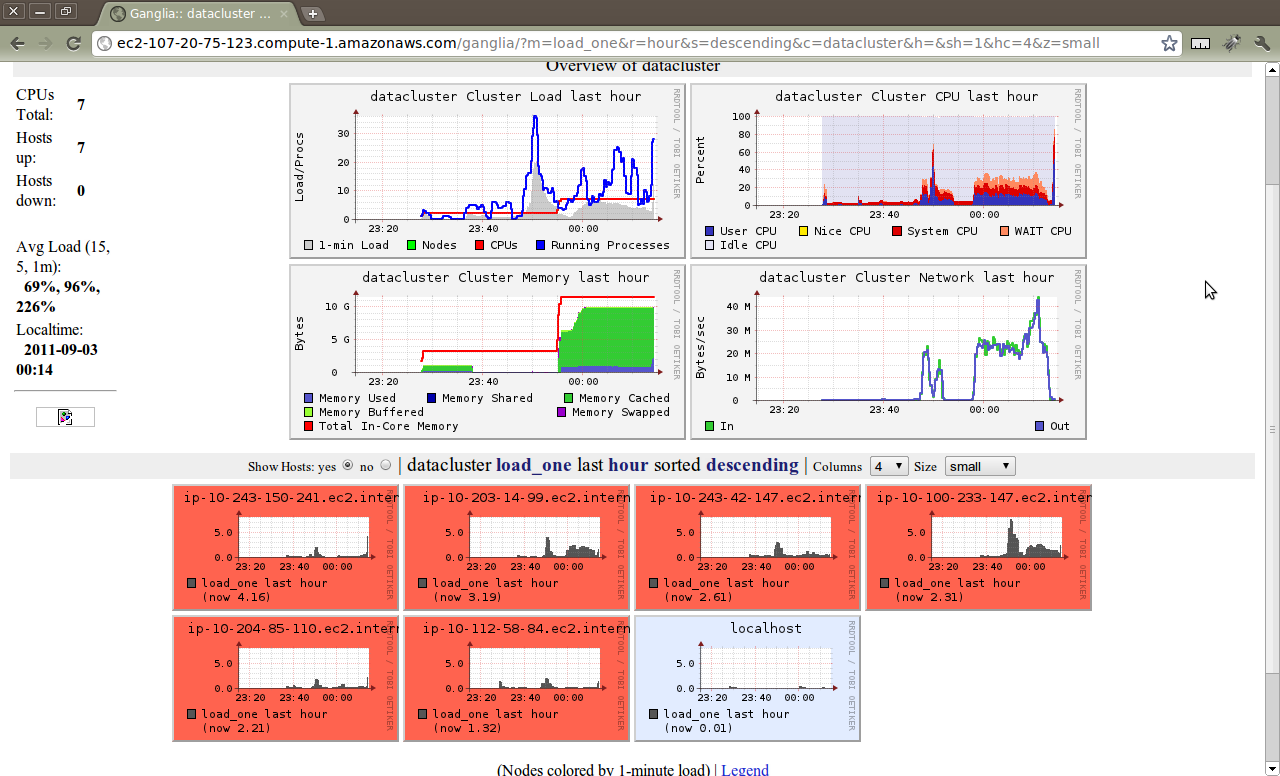
Of course, I’m just playing around with ganglia at the moment… For real performance, I’d change my juju config file to choose larger (and ephemeral) EC2 instances instead of the defaults.
A Few Details…
Let’s grab the charms necessary to reproduce this.
First, let’s install juju and set up a our charms.
$ sudo apt-get install juju charm-tools
Note that I’m describing all this using an Ubuntu laptop to run the juju cli because that’s how I roll, but you can certainly use a Mac to drive your Ubuntu services in the cloud. The juju CLI is already available in ports, but I’m not sure the version. Homebrew packages are in the works. Windows should work too, but I don’t have a clue.
$ mkdir -p ~/charms/oneiric
$ cd ~/charms/oneiric
$ charm get hadoop-master
$ charm get hadoop-slave
$ charm get ganglia
That’s about all that’s really necessary to get you up and benchmarking/monitoring.
I’ll do another post on how to adapt your own charms to use monitoring
and the monitor juju interface as part of the “Core Infrastructure”
series I’m writing for charm developers. I’ll go over the process of
what I had to do to get the hadoop-slave service talking to monitoring
services like ganglia.
Until then, clone/test/enjoy… or better yet, fork/adapt/use!
If you have any questions or feedback, please feel free to share it with me on Twitter: @m_3